Recon review and normalization
Normalize saved recon into a provenance-preserving local inventory, then use it to expose coverage gaps without expanding authorization.
This is the complete downloadable file. Open plain text ↗
---
name: recon-review
description: "Normalize saved recon into a provenance-preserving local inventory, then use it to expose coverage gaps without expanding authorization."
---

# Recon review and normalization

Normalize saved recon into a provenance-preserving local inventory, then use it to expose coverage gaps without expanding authorization.

Defensive study and review of artifacts supplied by their owner. Record missing evidence as an open question.

## Bring to the review

- Saved URL lists, JSONL, CSV, or HAR files
- Tool and collection timestamps
- Recorded scope and rules

## Review guide

### 1. Import rather than paste

When a local Hunt Workbench is available, call import_recon for each saved artifact. Preserve its source, timestamp, and observed technology fingerprints; repeated imports should remain idempotent.

### 2. Review normalized inventory

Use search_hunt_records to find assets, routes, technologies, and prior activity. Keep observed hosts distinct from authorized targets.

### 3. Record coverage honestly

Use record_check for what was reviewed and its state. Keep not_tested, partial, blocked, failed, deferred, and out_of_scope distinct so gaps remain visible.

## MCP calls

Public research on the hosted MCP (generic topics only): `get_research_context`, `search_research`, `get_research_record`.

Durable records in the selected local workspace: `import_recon`, `search_hunt_records`, `record_check`.

Keep private evidence and scope records in the local workspace.

## What to produce

- Deduplicated asset inventory with provenance
- Technology and route observations
- Coverage record with explicit gaps

## Common mistakes

- Discarding source or timestamp during normalization
- Treating a discovered asset as in scope
- Calling a partial crawl complete coverage

## Reading and source context

### Resources

- [OWASP Secure Code Review: baseline and change-focused review](https://vulns.co/research/resources/owasp-secure-code-review-methodology/)
- [OWASP Logging: trustworthy and minimal application evidence](https://vulns.co/research/resources/owasp-security-logging-evidence-quality/)

### Diagrams

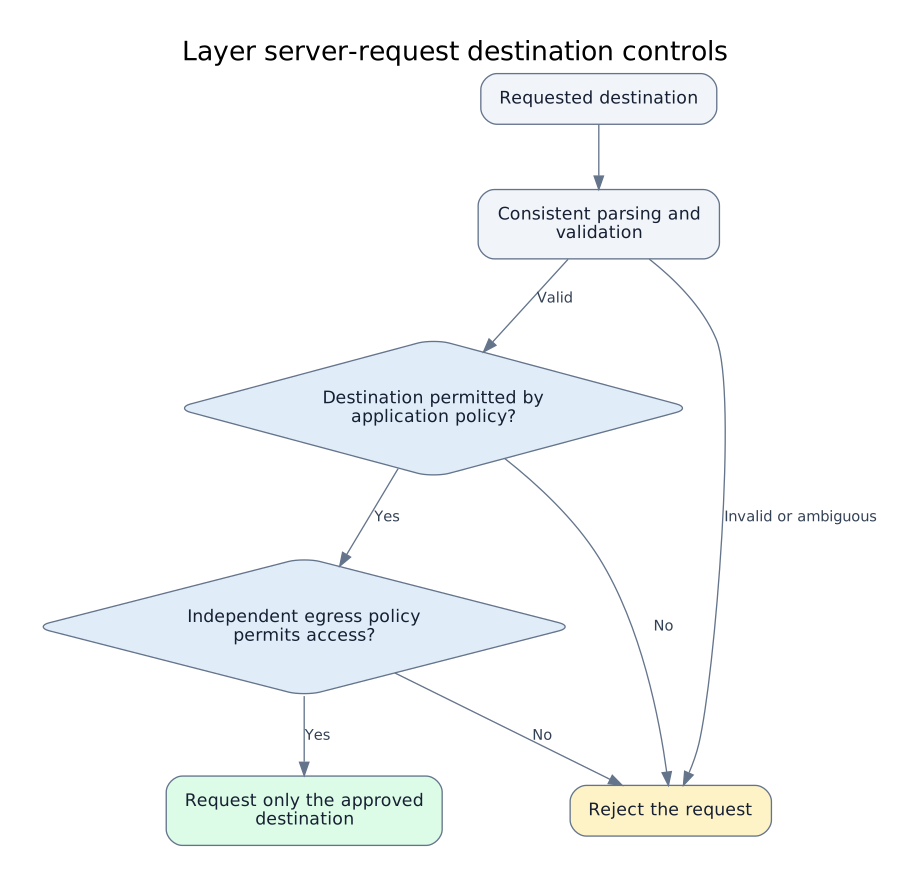
- [Layer server-request destination controls](https://vulns.co/research/diagrams/server-request-destination-policy/)

### Reports

- [Shopify Exchange screenshot service crossed internal boundaries](https://vulns.co/research/reports/shopify-exchange-request-isolation-2019/)

## Provenance

Editorial guide by vulns.co / GK Data. Updated 2026-10-12.
Library snapshot: 2026-10-04; commit d5550c7891119cf1379e235721541c947850a3b3.
The guide is an editorial synthesis. Linked records preserve their own sources and review dates.

Reader: https://vulns.co/skills/recon-review/
The review
What to look for
Defensive study and review of artifacts supplied by their owner. Record missing evidence as an open question.
Import rather than paste
When a local Hunt Workbench is available, call import_recon for each saved artifact. Preserve its source, timestamp, and observed technology fingerprints; repeated imports should remain idempotent.
Review normalized inventory
Use search_hunt_records to find assets, routes, technologies, and prior activity. Keep observed hosts distinct from authorized targets.
Record coverage honestly
Use record_check for what was reviewed and its state. Keep not_tested, partial, blocked, failed, deferred, and out_of_scope distinct so gaps remain visible.
What to produce
- Deduplicated asset inventory with provenance
- Technology and route observations
- Coverage record with explicit gaps
Common mistakes
- Discarding source or timestamp during normalization
- Treating a discovered asset as in scope
- Calling a partial crawl complete coverage
Use with MCP
Take this into the workbench.
The hosted MCP reads public research. The separate local Hunt Workbench saves private project records in your chosen directory.
Public context
get_research_context search_research get_research_record
Local record tools
import_recon search_hunt_records record_check
Continue the study
Reading & source context
Editorial notes above connect these references. Open each record for its original source and review date.
Visual models
Connected disclosures
From the field toolkit
Guide by GK Data · Research snapshot 2026-10-04.
Sources and review dates are preserved in the library provenance.