Hunt workspace intake
Start an authorized hunt as a portable, local project with scope, rules, and evidence boundaries recorded before work begins.
This is the complete downloadable file. Open plain text ↗
---
name: hunt-intake
description: "Start an authorized hunt as a portable, local project with scope, rules, and evidence boundaries recorded before work begins."
---

# Hunt workspace intake

Start an authorized hunt as a portable, local project with scope, rules, and evidence boundaries recorded before work begins.

Defensive study and review of artifacts supplied by their owner. Record missing evidence as an open question.

## Bring to the review

- User-supplied scope and rules references
- Local workspace location
- Approved accounts, environments, and evidence constraints

## Review guide

### 1. Create the local boundary

When a local Hunt Workbench is available, call init_hunt_workspace with the user-supplied scope and rules references. Keep its data and credentials in the selected local workspace.

### 2. Separate discovery from authorization

Record known assets as inventory. A hostname, URL, or technology fingerprint found during recon does not add permission to test it.

### 3. Set evidence rules

Decide which owned accounts and redacted artifacts can support a check. Use hosted get_research_context, search_research, or get_research_record only for public citations.

## MCP calls

Public research on the hosted MCP (generic topics only): `get_research_context`, `search_research`, `get_research_record`.

Durable records in the selected local workspace: `init_hunt_workspace`, `search_hunt_records`.

Keep private evidence and scope records in the local workspace.

## What to produce

- Local workspace with scope references
- Authorization and evidence boundary
- Initial inventory marked separately from scope

## Common mistakes

- Treating discovery as authorization
- Sending private scope or evidence to the hosted MCP
- Starting checks before rules are recorded

## Reading and source context

### Resources

- [OWASP Threat Modeling: system assumptions and mitigation validation](https://vulns.co/research/resources/owasp-threat-modeling-assumptions-and-validation/)
- [OWASP Secure Code Review: baseline and change-focused review](https://vulns.co/research/resources/owasp-secure-code-review-methodology/)

### Diagrams

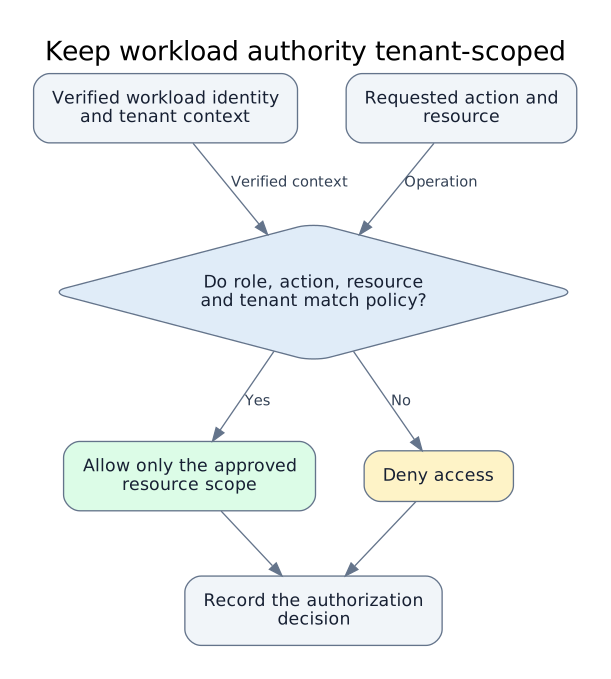
- [Keep workload authority tenant-scoped](https://vulns.co/research/diagrams/workload-identity-tenant-scope/)

### Reports

- [Meta service-identity exposure amplified by excessive secret access](https://vulns.co/research/reports/meta-service-identity-secrets-trust-boundary-2026/)
- [Actifio driver execution exposed excessive shared-service authority](https://vulns.co/research/reports/google-actifio-driver-service-identity-isolation-2025/)

## Provenance

Editorial guide by vulns.co / GK Data. Updated 2026-10-12.
Library snapshot: 2026-10-04; commit d5550c7891119cf1379e235721541c947850a3b3.
The guide is an editorial synthesis. Linked records preserve their own sources and review dates.

Reader: https://vulns.co/skills/hunt-intake/
The review
What to look for
Defensive study and review of artifacts supplied by their owner. Record missing evidence as an open question.
Create the local boundary
When a local Hunt Workbench is available, call init_hunt_workspace with the user-supplied scope and rules references. Keep its data and credentials in the selected local workspace.
Separate discovery from authorization
Record known assets as inventory. A hostname, URL, or technology fingerprint found during recon does not add permission to test it.
Set evidence rules
Decide which owned accounts and redacted artifacts can support a check. Use hosted get_research_context, search_research, or get_research_record only for public citations.
What to produce
- Local workspace with scope references
- Authorization and evidence boundary
- Initial inventory marked separately from scope
Common mistakes
- Treating discovery as authorization
- Sending private scope or evidence to the hosted MCP
- Starting checks before rules are recorded
Use with MCP
Take this into the workbench.
The hosted MCP reads public research. The separate local Hunt Workbench saves private project records in your chosen directory.
Public context
get_research_context search_research get_research_record
Local record tools
init_hunt_workspace search_hunt_records
Continue the study
Reading & source context
Editorial notes above connect these references. Open each record for its original source and review date.
Visual models
Connected disclosures
From the field toolkit
Guide by GK Data · Research snapshot 2026-10-04.
Sources and review dates are preserved in the library provenance.